Half-Elf on Tech

Thoughts From a Professional Lesbian

Author: Ipstenu (Mika Epstein)

  • Whois On First

    Whois On First

    Sometimes when I’m helping people out with their website, I feel like I’ve walked into an old Vaudeville act and we’re trying to figure out the answer to a question they don’t understand. The Internet gets newcomers every day and my conversations feel like this:

    Ipstenu: Strange as it may seem, they give computer terms nowadays very peculiar names.

    Costello: Funny names?

    Ipstenu: Code names, geek names. Now, to figure out everything about your site, we start with whois on first, What’s Your Host is second, I Don’t Know your app is third —

    For those of you who have never listened to Abbot and Costello do “Who’s On First” you need to take a moment to watch their televised episode “From The Actor’s Home” in 1953, the complete Who’s On First.(I grew up listening to them on the radio in reruns on KNX in the 1980s, and its safe to say that my concept of humor comes more from them than modern TV.)

    So when I run into these people who are brand spanking new to the web (yes, they exist), I’m a little annoyed when I find they are totally at a loss at what they actually need to know in order to keep their website up and running. In part this is because the people who build the sites aren’t ‘consultants’ but friends and they just do the needful and move on. Those friends mean well, I’m one of them, but when you make a site for someone else, you have a responsibility to them that they know what the heck they’ve got. Otherwise, you’re not as good a friend as you thought.

    But if you’re that newbie, what do you need to know to run your website? Three basic things! Whois! What is! Know is!

    • Your Domain Name: Whois On First
    • Your Web Host(s): What’s Your Host
    • What’s Running Your Website: I Don’t Know Your App

    That’s it. Three simple things. But in reality, they’re not that simple. And worse, the person who bought them is, technically speaking, the person who owns them. So if someone else bought your domain name for you, they own it. Not you. They have full, legal, rights to do whatever they want with it. Same goes for your hosting. It’s very important you put close attention to who is paying for your site, because if it’s not you, it should be. Don’t let your friends or consultants or developers buy these things for you, because then, legally, it’s theirs, and no amount of begging to a webhost or registrar will get them to give it to you.

    But let’s get into the details.

    Your Domain Name: Whois On First

    domain-namesYou know this, right? I’m looking at halfelf.org right now. But do you know where it’s registered?

    The domain name registrar is the company you paid to ‘reserve’ the domain name. It’s like your phone number. You paid AT&T to buy the number, and you can keep it as long as you want. But unlike the phone company where you pay for the number and the phone service, you may not be paying for both domain name and hosting in one go. In fact, many of us like to separate our host and our domain name, so if the host goes down, we can point the domain somewhere else.

    The ownership of the domain name is important, because if you don’t own it, whomever does can point it wherever they want. This happens, from time to time, when domains expire. Someone will snipe the domain (i.e. buy it when you’ve forgotten to renew) and take it. And there is very little (if anything) you can do about it.

    How do you find who your registrar is? It’s not that easy. If you use a tool called WHOIS to pull up the information, you’ll find a lot about a domain. For example, here’s what you can find for halfelf.org:

    Domain ID:D165216955-LROR
    Domain Name:HALFELF.ORG
    Created On:06-Apr-2012 13:52:55 UTC
    Last Updated On:06-Jun-2012 03:50:37 UTC
    Expiration Date:06-Apr-2014 13:52:55 UTC
    Sponsoring Registrar:eNom, Inc. (R39-LROR)
    Status:CLIENT TRANSFER PROHIBITED
    

    I removed some of the lines, because my information is WhoisGuard Protected. Normally it shows phone numbers, addresses, and so on. By law, you have to keep that stuff up to date and correct. Most of us forget. But none of that actually tells me what I need to know. See, I know who my registrar is, but all I see is “Sponsoring Registrar:eNom, Inc.” and that actually isn’t it.

    Except it is.

    My domain registrar is NameCheap, and NameCheap is both an eNom reseller and an ICANN-accredited registrar. I know, that was Greek, but what it means is there’s a list of people who are allowed to sell domain names, and this is the ICANN-accredited registrar and on there you will find both NameCheap and DreamHost, as well as Automattic (aka WordPress.com) and so on. So if they’re listed, why does my WHOIS show as eNom? Because they’re using eNom. Now as a separate example is my domain elftest.net, which shows up as NEW DREAM NETWORK, LLC. And that is, in this case, where I registered it.

    If you get eNom as your registrar, don’t worry, you can easily find out who your actual registrar is via their reseller lookup tool. Toss halfelf in there, and you’ll see it’s NameCheap. Whew!

    Your Web Host: What’s Your Host

    hosting This is the company you pay monthly (most of the time) to host your site. They generally have your email, too, though some people use Google’s Gmail ($5/year, yes, it used to be free). The Web Host is where your website ‘lives.’ All the files, all the pictures, all the email. It’s really easy to see who your host is, thanks to tools like WhoIsHostingThis.com, which can tell you that HalfElf is hosted on LiquidWeb.

    If you can’t tell, this is pretty simple to suss out, but also very important to know. And just because you know who your host is does not mean you know the user account or passwords associated with it. If you are the person who pays the bills, you will always be able to get the account back by using your credit card info, but really this is something you should be keeping track of, because if you’re not paying for it, you’ll never ‘get it back.’ It wasn’t actually yours to begin with.

    Speaking as a web host, the question I hate to hear the most is “I don’t have my login information for you guys, can you give it to me?” For what I think are pretty obvious reasons, unless you can prove you’re you, no we cannot hand you access. You need to know the login ID, the email address, the physical address/name of the owner, or some credit card into, in order to prove you’re you. You are not Gracie Allen, after all.

    What’s Running Your Website: I Don’t Know Your App

    90737-1This is the ‘what runs my site?’ one, and I am often amused by people who don’t know they’re using WordPress. Why amused? Because it’s at the bottom of every page, it’s on my login page, and … well it’s there. I don’t advocate removing all traces of WordPress from the site, because when you’re trying to figure out ‘what’ runs your site, these are helpful clues.

    Even if you don’t use it, you should know what it is. Check if your site has a ‘readme.html’ page like https://halfelf.org/readme.html. Drupal has a README.txt (see http://www.typepad.com/README.txt for example), and MediaWiki just uses README (see http://jorjafox.net/wiki/README for one). So you may need to try multiple variations until you find one.

    Of course, complicating that is the possibility of custom code. If your site is just plain HTML, hey, awesome. It’s easy and flexible and you’ll be fine. But the custom stuff, where someone comes up with cool ways to do things and doesn’t document them… this is why I like Web Apps, personally. Someone’s documented, or if not, there are other people who know how to help me.

    What else?

    What do you consider a ‘must know’ when you’re hosting a site? One thing that’s always interesting to ponder is “Where does my email live?” When I host other people’s sites, I tend to put their email on Google or another email only service, since that makes ‘moving’ way easier. Never assume people will want to have their files with you forever.

  • Code By Any Other Name

    Code By Any Other Name

    red_rose__lips-wideWhile this post is mostly geared to how to better name WordPress themes and plugins, the concepts should be easy to extrapolate for just about any bit of code. One of the hardest things to do, as a developer, is to come up with a name for your plugin or theme. Sometimes it’s really easy, like if you want to make a plugin that shows the phases of the moon as a widget, you’d probably call it ‘Phases of the Moon Widget.’ But is that the best name to give your plugin?

    One of the least obvious aspects of plugins is that the name you submit when you fill in the form on the WordPress Add a Plugin Page is the name you get for your plugin. So if you submitted ‘Phases of the Moon Widget’ then you get the url http://wordpress.org/plugins/phases-of-the-moon-widget, and that will also be the name of the folder on someone’s blog: /wp-content/plugins/phases-of-the-moon-widget/. That may not be what you wanted.

    When you’re coming up with the name of your plugin, few people give thought to the ‘slug’ you get with your plugin. They try to think of a name that is evocative and descriptive, but often not short and succinct. One might think, in this Twitter/SMS world, we’d be better coming up with short plugin names, but we often get plugins like ‘recently-used-categories-with-alphabetical-or-most-used-ordering’ and then the author gets annoyed with his URL.

    In fairness to everyone, this isn’t well understood. And even I have plugin names I regret in the long run. The process is a little mystical and magical to how someone should be submitting a plugin with name and description. After all, you have more than one name and description to consider. You have the name, the slug, the description and the readme. Ouch! How do you do it?

    Base BellesFor this example, I’m going to pretend I wrote a plugin that pulls in data from mlb.com and sends an email to people on my blog every time the Cleveland Indians win a game. I plan for this plugin to be used for a BuddyPress community (The Base-Belles), but after I wrote it, I realized I could make this work for any MLB team, and for wins and losses. Thus I now have a plugin that, on my site, is probably called “Indians Game Winner Emails” and has a slug like “indians-winner-emails” or something weird like that. When I write code just for myself, I rarely concern myself with anything fussy with names.

    I’ve also made a theme for this site that I want to share, and I’ve called it “Base-Belles” (after the site), but if I release this to the world, I’d want to make it something everyone can use for any team’s fan group, so I will genericize that up.

    When you submit a plugin, you’re asked for a name, a description and a zip. So let’s get started. When you submit a theme, you’re uploading the zip directly, and it’s in there you pick your name and slug. So for themes, this is less of a hassle, but the basic principle remains.

    The Name

    Even themes have two ‘names.’ You have your slug-name and your name-name. As I go to submit my plugin name, I might be tempted to type in “MLB Game Results Emailer by the Base-Belles” and in some ways, that is a great name for a plugin. It’s descriptive after all. But the first thing you need to do is drop any mention of ‘by…’ with your submissions. That’s just not needed, as a theme has a style.css to show who wrote it, and a plugin has the readme. We’ll know.

    That means your name is now “MLB Game Results Emailer” which looks great. Or does it. Do I really want the slug mlb-game-results-emailer? What about mlb-results-alerts instead? That’s not much shorter, but as a slug goes, it’s descriptive. Even mlb-results-mail would be better. They’re to the point, and when I read the list of plugins via SSH or SFTP, I’ll know right away which plugin it goes with. This means I will submit my plugin with the name “MLB Results Mail” and I’m happy.

    If this was a theme, I’d call it “Base-Belles” after the site, and use the slug base-belles. Boy that would be easy. Except … I generalized it, didn’t I? Now I have “MLB Fansite Theme for BuddyPress” which is a good name, but a bad slug. So for a slug, I’d use mlb-fansite instead. My child theme for my own site will become base-belles and now I’m happy here too! If I was really clever and totally made the theme generic, it would become “Sports Team Fansite” and sports-fansite.

    Descriptions

    When we ask for a description what we really want is your short description. “This plugin sends an email to your subscribers every time your chosen baseball team wins a game.” Or a theme “This BuddyPress optimized theme is perfect for running fan-sites for baseball teams.” This is all anyone wants to see for a short description. It should fit in a tweet. Short, simple, perfect.

    Why don’t we want all the details? Well for one you overwhelm us with too much information at once if you paste in the readme. And for another, themes and plugins gets hundreds of reviews to comb through a day. Keeping it simple and short saves us time, which makes it easier for us to work through high volume. Where we want to see details is in your readme.txt. These are absolutely required for a couple reasons. First (and most important) we want to know that you’re ready to go live. A plugin should only be submitted when it’s ready to be released to the wild, after all, and that means you have a fully finished wordpress.org repository page which is handled by (you guessed it) the readme. If I can’t read your readme and go “Aha, that’s how the plugin is installed and configured and that’s how I use it” then you have done something wrong. The readme.txt is your gateway drug. Love it. Make it sing.

    Something I often tell people who have had plugins rejected is that when they resubmit “Put ‘I talked to Ipstenu about XYZ’ in the description so we know you’ve already spoken to one of us. That makes it painless for me to look in our group email box, find the previous conversation, make sure we’re all on the same page, and approve. Also if I both handled the earlier conversation and I see your submission, it’ll trigger my memory and I’ll get through your ticket faster.

    ZIPs

    As of today, you cannot submit a plugin or theme to the WordPress.org repositories without a zip. not a RAR, not a gzip, but a zip.

    I love getting zip files, but many times people submit zips that don’t open on linux, or have another zip in them. What we want in that zip is your complete plugin that I could upload to a test site. A theme will be auto-rejected by their scanner if it doesn’t meet their standards, you’ll have to start over. Plugins we still review everything by hand, so we have to open your zip. Personally, I use TextWrangler, which actually lets me open a zip without having to unzip it, but sometimes people zip things weirdly and I have to open it and drag the folder up.

    If you’re using Github, there’s a built in link to a zip, which you can send us. BUT. Keep in mind, the zip will not bring in submodules. Yeah, ain’t that a damn dirty trick? You can use it to update your own code, but anyone who pulls down a zip to test with won’t get it. That really annoys me, and I’m not sure if it’s a bug or something Git did intentionally. Oh, submodules. You’re so complicated.

    Do we care what you name your plugin’s zip? No. Do we care that you’re calling that name explicitly in your code? Yes. Use functions to determine directories and save us all a hassle. Do we care about calling wp-config.php and other WordPress core files by name? We sure do, but that’s another topic altogether.

    Summary

    In summary? Short slugs, descriptive names, simple descriptions, detailed readmes.

    Of course, that’s high level stuff and doesn’t explain how to pick a plugin name. I’m highly fond of puns (hence Genericon’d) or I name things based on their original concept (rss2email was plugin’d as post2email). Sometimes the name is just obvious (Rickroll). Do you have tricks for coming up with a good name?

  • DreamCon In Review

    DreamCon In Review

    atimThe weekend after WCSF I talked at DreamCon, which was our own little Webhost convention/camp for technology and other things. As Matt said, we’re kind of the wacky Webhost, and I love it that way here at DreamHost.

    Some of my coworkers talked about the technical stuff, like WP-cli and how DreamPress works, but I talked about some slightly more esoteric and conceptual things, no coding involved topics, because I tried to think about the questions people who host with us asked me the most.

    Choosing WordPress Plugins

    This was the more geeky of the two, but was an overview on how I search for plugins, value the devs and their work, and determine which ones I use. I mentioned needs and wants a couple times, which makes me think I’ll end up giving people a talk on that one of these days…

    The questions I got after this session were interesting. I preemptively answered the long standing question I had never been able to answer before, which is “What is your favorite plugin?” I finally have an answer, and it’s MP6. My eyes suck, and for me, MP6 finally made the back end of WordPress totally readable for me, without having to increase my browser’s font size. The font was better, and larger, and clearer. Normally I hate black backgrounds, but for some reason MP6 doesn’t give me headaches.

    The best question I got was how to search effectively. My answer was to be more exact with search terms. Too often we go for broad terms and narrow down, but I like to go the other way. “wordpress plugin calendar event list” – I pick every major term I need in that plugin, and more precise results follow.

    Get Out Of The Monkey House

    Besides the fact that all the devs in the room cheered when I stated “code is art” I think this one really opened people’s eyes. Remembering that the design of your site doesn’t stop at the pretty stuff, that your content and the flow of how the site works is also a major impact, is huge.

    By the way, code is totally art. You’re making something out of nothing, inventing and building a concept that never existed before. It’s just like writing music. Be proud of it. The most standout question from this talk was what do I do when a customer demands they stay in that monkey house? I put my foot down. When I get into contract work, I have always stated up front “You’re hiring me to be your expert, which means you may suggest things for your website that I, out of my experience and expertise, know to be bad ideas. When that happens, I will tell you that we should not do these things, and why. This is my power of veto. I will only use it when I have proof, via research, that what you are proposing is not in your best interests. If that’s not okay, then we don’t sign the contract. If it is, then you will accept my actions on web design, just as I will accept yours about your product. You know more than I do about that, I know more than you about this.”

    tumblr_ma1mh5Cpbs1rdkmnho1_500

    Thus far, no ones walked away, and I’ve never made a website with a blink tag (except for the gag website, where the contract was to make it look like Ling’s cars…).

  • WCSF Video: Don’t Use WordPress Multisite

    WCSF Video: Don’t Use WordPress Multisite

    [wpvideo LYqducp0 width=”800″]

    Too many people see Multisite as a silver bullet that can do everything they need, only to find out they’ve bitten off more than they can chew, and now they have a site that is too big, too complicated, and too much of a hassle. Understanding what Multisite does out of the box, what it’s best at, and where it’s easily extendable will help you build the right site.

  • How To Duplicate Content

    How To Duplicate Content

    I’ve talked about this before. 100% duplication of content on multiple sites is bad. So why am I going to tell you how to do it? And better, why am I going to tell you how to do it without Multisite? Because as a proof-of-concept, it was interesting.

    The rest of this post tells you how to do something I don’t advocate, nor will I support. If you have a better way, or improvements, please leave comments. Otherwise, you’re on your own when you do this. I will not help you do it in any way, shape, or form.

    Honestly, I still think this is a pretty silly idea. Duplicating content is a terrible user experience, and I still flat-out decline to accept any work for doing this. Sharing content is one thing, but 100% duplication of sites makes no sense at all to me. Yoast also says it’s a bad idea. But, if you really are totally 100% dedicated to do this, and you absolutely are going to, damn the torpedos, then you should do this in the least computationally expensive way possible. And that would be a single install.

    Now all that said, this means you’ll need to do a lot of monkey-work, so why do I call this ‘easier’? In many ways, easy is relative and this will be hard, complicated, and may I stress, entirely unnecessary. You’re going the hard way around for something that good planning and a solid understanding of the Internet totally negates. Remember the absolute rule of the Internet: Use one URL per page and never change that URL. (With all rules, there are exceptions, of course.)

    The way to make all this work, without Multisite, is by tricking your domain a little. There’s a neat trick with parking (or mirroring, depends on your host) domains, that lets you keep the other domain URL in your browser’s address bar. That’s what I do with this site, actually, halfelf.org is parked on top ipstenu.org. And with a park, the URL always stays as halfelf.org. Hey look! Two URLs, one site! Multisite has secret sauce to know “Someone’s coming to HalfElf, send ’em to site .” But on a single site, all my links would still be ipstenu.org and not halfelf.org.

    Now how do you use this to duplicate content? You use relative URLs.

    So here’s a real example. I have twofer.elftest.net set up to mirror plugins.elftest.net (which will give you a coming soon page, it’s just where I like to blow things up for tests).

    In the beginning of this post, when I linked to my old post about Duplication Dilution, the URL was https://halfelf.org/2012/duplication-dillution/ and that is what we call an absolute URL. Because I’m mapping domains, I can leave those in without worry, but if I wasn’t, I’d change that URL to /2012/duplication-dillution/ instead. Right away this makes my URLs entirely relative, no domain name included, and I’m off to the races.

    This doesn’t solve everything, though. See, WordPress really wants to use absolute URLs. There are plugins like root relative URLs, and those will help a lot. None of them back-ports your existing posts, though, so for that it’s nothing for it but to search/replace the DB and change your post content.(ONLY change your post content. Do not change GUIDs!) I really like those plugins because now for a new post, when I add a link and chose to link to existing content, it happily works:

    addinglink

    And when I add an image, it too smartly handles as I want it to:

    addingimages

    That’s the easy part of all this, though. Now you have to disable canonical URLs, so that you don’t end up with even more of the dread duplicate content penalty in WordPress.

    remove_action('wp_head', 'rel_canonical');
    

    This also stops WP from redirecting things like http://plugins.elftest.net/?p=1 as well, however, so keep that in mind. Of course, that’s what you wanted. But they don’t address the problem of your source code. If I view source on twofer.elftest.net, it still showed plugins.elftest.net, and that would be a problem for images and themes. You’ll need to toss in this to your wp-config.php, which will dynamically change your URL to be whatever URL I’m visiting from, so that changes automatically. Awesome.

    define('WP_HOME', 'http://' . $_SERVER['HTTP_HOST']);
    define('WP_SITEURL', 'http://' . $_SERVER['HTTP_HOST']);
    define('DOMAIN_CURRENT_SITE', $_SERVER['HTTP_HOST']);
    

    Now I want to tell WordPress that wp-content is not in URL/wp-content/ so let’s just put this in and make it relative too!

    define('WP_CONTENT_URL', '/wp-content');
    

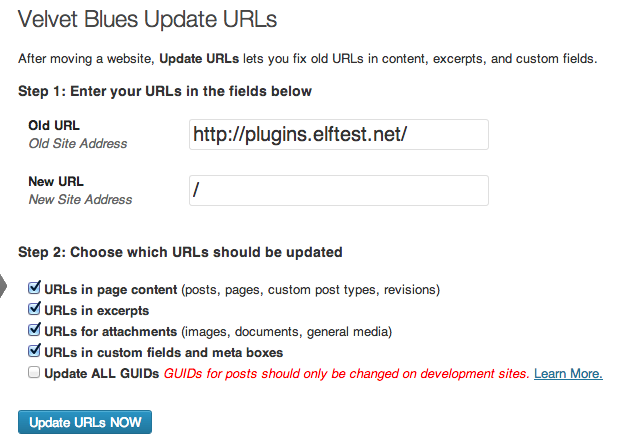
    I’m still going to have to search and replace my old post content (I used Velvet Blues for this):

    Velvet Blue Update

    But that didn’t address the problem of the source code. 90% of WP now thinks it’s all on twofer, which is what I wanted, but look at XMLRPC:

    sourcecode

    the_more_you_know2And even better, when I try to log in via twofer, it still says I’m going to plugins. Oh and it doesn’t pass through cookies, so really, I never log in to Twofer. Realistically? This isn’t a problem. I’m always going to use plugins.elftest for all this when I log in on the backend, and since the convenience of all this was meant for the front end, and it’s just pingbacks. And why is that? Honestly, I don’t know. I have a guess that since, at WordPress’ heart, the site is always plugins, the absolute URL there has to be what it is, but in so far as all that goes, I think it meets the needs of why most people want to do this.

    Conclusions? You can do this. If you wanted to, you can hardcode the theme so the domain you visit the site with will dynamically change the header image, or widgets, or anything else you want. PHP is pretty cool that way and WordPress is too. But I would never do it, except as an experiment to see what I could do it at all.

  • What WordCamp SF Means to Me

    What WordCamp SF Means to Me

    Andrea Middleton asked me to write something about either my upcoming talk today at WCSF or about the camp in general. I thought about it for a minute and sent her this:

    I probably have one of the stranger (but not strangest) associations with WordCamp San Francisco: abject terror and absolute salvation.

    In 2012, I went to WCSF for the first time, amidst some of the roughest professional turmoil of my life. At the time, I worked for a bank and was exceptionally unhappy with my work. I really wanted to work doing WordPress, and had spent much of the last 12 months applying to places and just not finding the right fit. Then I decided I should go to WCSF and see if I could make magic happen there, so I bought a ticket and had my car decide that brakes were optional. Short on the money for the trip, I appealed to the community, crowd raised the funds, and the day after I made goal, was asked to speak! I’d never spoken at any WordCamp, but I said yes because I was determined to change my life. Serendipity happened again, and I was contacted by DreamHost about a job. They too were coming to WCSF, so we had an interview and then agreed to meet up after my talk. This meant my talk was also part of my interview, and thus extra terror set in.

    Of course, everything worked out perfectly. Now I’m happily employed doing WordPress work, traveling the US talking at WordCamps, and otherwise helping the community at large, being paid to do what I love.

    Source: WordCamp SF 2013

    Later today I’ll be talking about why you shouldn’t use WordPress Multisite. Spoiler alert: I love WordPress Multisite.