
I like hosting my own things. While I have WordPress (mostly) on a managed instance, I keep a number of other apps on my dedicated server. Those tend to be apps that aren’t … as popular.
That isn’t really fair, actually. The apps are often quite popular, but they tend to be less user friendly popular. WordPress is user friendly popular. Drupal is dev friendly popular. And Postiz is super nerd unknown.
What is Postiz?
Postiz: An alternative to: Buffer.com, Hypefury, Twitter Hunter, etc…
Postiz offers everything you need to manage your social media posts, build an audience, capture leads, and grow your business.
Basically it’s a social media manager. You can post to all your socials at once, you can schedule it, and you can auto post. If you want to pay them for hosting and running it, it’s pretty reasonable ($50 a month for ‘pro’). But I wanted it for LezWatch.TV and spending the least amount possible is better.
For me, self hosting Postiz was a no brainer. It’s easy enough to install via Docker, it’s easy to set up an Nginx reverse proxy, and it’s easy enough to configure.
Mastering it, however, I’m still working on.
Where Postiz Kicked My Ass
I have it running now, but I wanted to talk about the things I screwed up or confused me,
There is no UX to enter your data (like API keys for Facebook), you have to put them in your Docker compose file, or in a config file in one of two places. The documentation is pretty clear, but my brain just got turned around. Once I got it working, I realized any time I added one, I’d have to restart Docker.

I can live with that, especially since I can add BlueSky via the UX which suggests to me that this is the way the one man shop is heading.
That is one of the problems, though. This is one man’s project. He builds this the way he wants to, for his product, and he manages it the way that makes sense for him. I have no idea how he runs it on the service, but maybe it really is him making a separate Docker instance for each customer?
Actually, it’s probably in Helm, but the point remains.
Working the Machine
I don’t have a preferred coding style. By that I mean, tabs and spaces are not the hill I die on. The Oxford Comma, on the other hand, you can pry out of my cold, dead, hands. And please don’t get into a fight with my wife for saying “the proof is in the pudding” because it’s really “the proof of the pudding is in the eating.”
But I digress.
The UX of Postiz isn’t really my favorite. It’s not super iPad friendly, and the settings are in weird places — like auto post is under settings, while everyone else is on the sidebar. It’s not how I’d design things. Why aren’t there toggles to enable/disable the AI agent?
Oh, and why doesn’t Autopost explain it actually requires AI?
Documention Is A Pain In The Ass
I know it, you know it, moving on.
One of the reasons I eventually decided to remove Tianji and go back to HealthChecks.io and Uptime Kuma was documentation, but a different way. Tianji’s documentation was AI generated which, in general, I’m not opposed to … assuming you proofread. Blindly trusting the translations of AI though, for your documentation, is asking for trouble.
So much of the English was poorly handled that it made aspects of Tianji unusable for me.
The UX in WordPress wasn’t to ‘my’ taste when I started using it, but after twenty *cough* years, it’s second nature. It was a UX I could adapt myself to. Right now, Postiz feels the same way. Especially since I’m not using auto post.
AI In All The Wrong Places
There are two ‘big’ issues.
- You’re locked in to using OpenAI
- Auto posting requires the undocumented use of the AI
By default, Postiz uses an AI agent to summarize the content from the rss feed. I don’t want to use AI for auto posting. It’s an rss feed, I assumed it grab the image, but trim the content. That’s how everything else tends to run. Oh yeah, you can only auto post from an rss feed.
This isn’t a huge problem, I have a custom rss feed for the things I want to auto post anyway. But the AI part? I did not need it. Thus, I didn’t put in any credentials for OpenAI and thus, it did not work. Which took me forever to figure out.
So I went to WordPress.
APIs! Let no one else’s evade your eyes!
Apologies to the late, great, Tom Lehrer. Here are some facts:
- Postiz has an API.
- WordPress has an API.
- My HealthChecks and Uptime Kuma instances have APIs.
Which means I can use APIs to cross trigger events!
And better than that, I actually know how I can trigger this. See, once a day I run a cron job (real crontab cron) that triggers changing the “show/character of the day” data. The only way to trigger the update is via WP-CLI (for a number of reasons). This means I can add a hook to my existing ‘of the day’ code and it will trigger a Postiz action.
Since we have already generated the post of the day, I pass that data to my Postiz class. That code checks if there’s already a post like that within the last 24 hours (to prevent an accidental repost). If there isn’t, we post it.
That’s it. It’s that simple. And I did the same thing to hook into when blog posts are released. I even made a backend UX for the WordPress site to allow in place adjustments without having to update a config file.
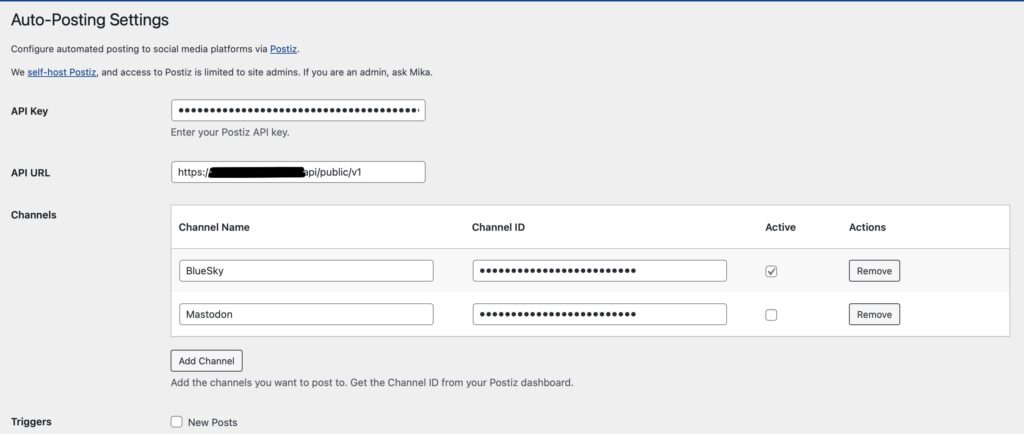
I’m tempted to do the same thing to report downtime. If the site is down, we could autopost “we’re aware of issues with our site. Updates will be at status…” because Postiz is on a different server. Once I’m more confident in my status page situation, I may just do that.
Remember To Call It Research
I don’t buy into the sunk cost fallacy. Even if I fail miserably at using Postiz, I will have learned a lot more about how the APIs for all the social media sites work.
I’ve used so many various uptime systems, trying to find the one that worked best for me, and I don’t consider any of that work to be time lost. I’ve learned more about myself and how I work, and what I actually want to track.
I haven’t yet found a lot of alternatives to Postiz, nothing for self hosting except Mixpost, and they’re only free for the Lite version (which only allows posting on Facebook, X/Twitter, and Mastodon).
And whatever I learn here, I’m sure I’ll use later.
One thought on “Manage Your Social Media Calendar: Post Iz Easy”
@Ipstenu This looks cool!
Comments are closed.