There are a lot of you guys who use WordPress (probably that’s my fault) and like me, you bash your head in when a news source makes a video embedable, but only if you use their code. Why is this a problem? Most of us like using WP’s visual editor, and that means we have to switch to text mode, paste this in, and then never ever ever visit that page in the visual editor again:
In part this is because WordPress uses TinyMCE for editing GUI-like, and switching between visual and text mode kills things. But on the other hand, how come we can just paste in a YouTube URL and that works? Well it’s a magical thing called Embeds, and basically WordPress sees that URL for YouTube and knows “OH, I should be a video and YouTube has a special code on it’s sever to tell me how to display it! Yay!”
Not everyone has that. TV Guide, CBS, etc. I’m looking at you. Where this makes sense is where they do not want you to embed a video because they want the traffic to themselves, which is fine. We can link. But where it’s daft is when they make it embeddable, give you that link, but it’s flipping ugly and can’t be used in the visual editor!
While the search function doesn’t work ‘great’ right now, probably because I’m searching for their videos with the wrong keywords, but still I was able to embed a video like this:
So this wasn’t super obvious, and personally I would love it if Ooyala had an oembed and then a ‘share this on WordPress’ link for things, but seeing as Automattic (and Pete! Hi Pete!) helped with the plugin, this may be as good as it gets for now. Maybe they could marry it into the Media Uploader, below ‘Insert from URL’ – have ‘Insert from Ooyala’. Dreams. I haz them.
There’s a lot to this plugin that I didn’t need, though. After all, since I don’t have an account, I don’t need all the search stuff, so I stripped it down to just this (which is an mu-plugin):
/**
* Ooyala Shortcodes
* Usually for crap like TV Guide
* Example: [ooyala video_pcode="VlajQ6DTdv9-OYPHSJq6w4eU0Bfi" width="222" embedCode="NwdzM3aDp4BB3-MEdPemlMJK5XH7ZVdn"]
*/
add_shortcode( 'ooyala', 'ooyala_shortcode' );
function ooyala_shortcode( $atts ) {
extract(shortcode_atts(array(
'width' => '500',
'video_pcode' => '',
'embedcode' => '',
), $atts
));
$width = (int) $width;
$height = floor( $width*9/16 );
if ( !is_feed() ) {
$output = '<script src="http://player.ooyala.com/player.js?video_pcode='.$video_pcode.'&width='.$width.'&deepLinkEmbedCode='.$embedcode.'&height='.$height.'&embedCode='.$embedcode.'"></script>';
} elseif ( $options['show_in_feed'] ) {
$output = __('[There is a video that cannot be displayed in this feed. ', 'ooyalavideo').'<a href="'.get_permalink().'">'.__('Visit the blog entry to see the video.]','ooyalavideo').'</a>';
}
return $output;
}
“Comments aren’t working,” he said and I winced. I hate when people say ‘broken’ or ‘not working’ because I don’t magically know what they mean by ‘working.’ But this guy was a coworker whom I like and trust so I asked what he meant by not working, and he said “When you enter a comment, the page reloads, but there’s no comment.”
“Okay,” I muttered to myself. “Touché, Mika.” Because that, indeed, was ‘not working.’ We turned on debugging and got a strange error:
WordPress database error: [Duplicate entry '0' for key 'PRIMARY']
INSERT INTO `wp_comments` (`comment_post_ID`,`comment_author`,`comment_author_email`,`comment_author_url`,`comment_author_IP`,`comment_date`,`comment_date_gmt`,`comment_content`,`comment_karma`,`comment_approved`,`comment_agent`,`comment_type`,`comment_parent`,`user_id`) VALUES (507,'lori','admin@example.com','','12.248.40.138','2014-02-07 23:07:08','2014-02-07 23:07:08','test',0,'1','Mozilla/5.0 (Macintosh; Intel Mac OS X 10.9; rv:26.0) Gecko/20100101 Firefox/26.0','',0,1)
And then it was a mess of ‘Trying to get property of a non-object…’ and ‘headers already sent.’
After some kicking of the usual suspects (reinstall WP, remove plugins, theme, etc) I realized I was stupid and the problem was that the table wasn’t updating the primary entry. It should start at 1 and move up to 2 and so on. Since everything else was working, I compared the table to a working one … and they were not the same. Here’s a good one:
There’s had comment_id as the name, and the rest of the values were blank. So I restored the values and it worked! Except … I was getting a new error.
Notice: Undefined property: stdClass::$comment_ID in /home/wp-includes/comment.php on line 155

Warning: Cannot modify header information - headers already sent by (output started at /home/wp-includes/comment.php:155) in /home/wp-includes/pluggable.php on line 896
I stared at that for a moment and after I had given up and proposed we reinstall WP and copy tables over, my brain kicked in and I said “Wait a second, isn’t that comment_ID and not id?” I changed it on a whim and shouted “HOLY **** I AM GOOD!”
Yes, it was in all caps. Yes, it was said to my coworker, who said I have his vote.
That was, by far, the weirdest error I’ve seen in months. And the moral of all this? You can’t know everything, but if you read and pay attention and are willing to experiment, you can solve pretty much anything.
I’m sure you know there are clubs out there that re-sell WordPress products at a far lower cost than their original source. This post is not about that being right or wrong via the GPL, nor is it about the morality.
This post is about responsibility.
In my home office hangs a poster “Flynn Lives” which I have to constantly remind me “I fight for the users.” It’s a nerd level joke most of my fellow developers and support gurus get, but many people I help would not understand the point. My job, as a WordPress Support Guru, is to help people. This is simple, straightforward, and obvious.
My other job, though, is to make their lives easier and better. It’s my responsibility, when I write code, to make it do something to make someone’s life easier. Even if the only person it helps is me, the point is that someone is being helped. If it’s just me, it’s really easy to support myself. “Hey, Ipstenu, you know this broke?” “Yeah, added to my list!” But when it’s someone else, how does that change?
I firmly believe there’s an expectation of support with all plugins and themes hosted in the WordPress.org repository. Period. That means, yes, I have code I don’t put up there because I don’t care to support it. But I know that expectation puts responsibility on me as more than just “Someone who writes code.” I can’t just write code, drop it into the world, and never support it.
“But Ipstenu,” I hear you say. “Isn’t that what WordPress.org does? It just dumps WP into the world. I never see the devs in the forums!”
You’re not WordPress.org. You’re not that big, that complex, and that intricate. Unless you’re BuddyPress-levels of plugins, and you’ll notice they have support forums. Instead of directly supporting WP, the core devs of WordPress who are dedicated to WordPress have people like me, who traipse about the forums and help. And when I see broken things, I either take it to trac or help the person who found it do so. My determining line is “Can I fix it? Okay, I’ll trac it and patch it.” If I can’t, I help them. Low hanging fruit.
The point here is that all this wonderful software came with a responsibility to make it great and help people. What does this have to do with sites like those Justice League Clubs that offer cheap/free versions of pay-wall’d software? They’re not helping you.
Oh, in the short term they’re helping you by giving you something for free. They’re getting you further in your site development than ever before. However that help ends at the provisioning level, because you aren’t paying for support from these resellers, you’re paying for product. That’s okay, so long as you know what you’re paying for, and a lot of people don’t. If people did know what they were paying for, they wouldn’t use nulled themes with base64 backdoors in them.
The ethics and morals of reselling someone else’s work aren’t at play here. Yours are yours, mine are mine, and that’s just fine. What is at play is what are we paying for, what are we providing, and what are we devaluing when we resell someone else’s product?
Devaluing is the easier one. People sell products at cost in order to make money. It’s simple. I work for a company that sells space on a computer and world wide availability from anyone to that space. We sell it at a price that allows us to make money, but also that allows us to hire amazing people like me who work on WordPress, write some of the code, test it, and otherwise spend all this time on WordPress, just because it’s software you use!
The value of the product is, again, not just in the product, but in the service. And the service is more than just access and accessibility, but also in the support you get. No matter what people think, we aren’t just rolling around in money and laughing at you. We reinvest that money in ourselves, our hardware, the software (some of which we give to you). But what we always do is support that. Sometimes the support isn’t what you want to hear, but we do our best to solve problems, or explain why we can’t.
So what are you paying for? Support! In the end, you’re pretty much always paying for support. You buy Microsoft Office and you don’t get the kind of support you get with WordPress, but you pay a lot more money. Where’s the support? When Word crashes, it sends (or asks you if it can send) a report back. That report gets noticed and acted on so that if it’s solvable, it’s solved. The next upgrade you get has a patch, and that crash doesn’t happen again. That’s support!
You can also get actual support from Microsoft (though I know of no one who’s done so). They have people who write fantastic help docs and who monitor their forums and twitter. If you took Word (let’s pretend that was legal) and resold it, would you have all that?
But that’s a quite extreme example. WordPress plugins are significantly smaller in scale than MS Office. So why is Office (and Adobe Photoshop etc) so expensive if they don’t give you half the help that the free WordPress product does? There are a lot of reasons. Patents and copyright are expensive, and frankly we’re all willing to pay for it. When Apple dropped the price of the new OS down from hundreds to $25, we were all suspicious. When it became free, we flipped out.
But Apple wisely noted that making us pay that much money wasn’t helping them as much as it might. Free gives you a certain brand loyalty because we get to try before we buy. And we will buy those apps and those app add-ons (though I don’t fully approve of games that force you to pay to play all the time). We buy them because after we get the base product for free, we see the real value in the cost of the other products and we’ll pay for them willingly. Apple takes responsibility for their free software in interesting ways. We have to pay for assistance (most of us via the Genius Bar). And in the WordPress ecosystem, that too is what you pay for. The help.
So back to this whole “I’ll take your paid software and give it away” thing.
What are we paying for? I’ve heard tell that ‘Paying for support’ is a rip off. So is paying for documentation. I can see why some people balk at paying $25 a year for ‘support’ they may not ever need, and I’ve seen some companies work by letting you pay per-ticket. Though that makes people feel like you’re nickel-and-diming them, and I do agree it can come across that way. And yet that support which they so casually toss aside like an old shoe is where these free-software-clubs fall down.
There is one club that says they will support all the plugins they re-host. Many of us are suspect at the possibility of that actually working well, though given the odds of how small their sales will be to start with, it may end up sustainable. The problem is that they’re not going to be patching upstream. They’ll fix your issue, and then when the real source pushes the next version, they get to reapply their patches. Strikes me as a lot of work.
Is the payment system for some WordPress plugins and themes broken? I don’t think so. I think it’s not optimal for the user nor for the developers just yet, but monetizing these things is still relatively young. There will be mistakes and bad choices along the way. Finding the balance between the freedom of the GPL and the desire to make a living is difficult.
The ultimate responsibility we have with WordPress is to give back. We give back with support and with improving things for everyone. If we’re just doing things for ourselves, after all, we don’t share them. Are these clubs failing in those responsibilities? Not yet. But all eyes will be on them if they do.
“what to say when someone asks you to suck them off”
Not the sort of term anyone would really associate with this site. So imagine my surprise when I saw my search stats in Jetpack:
That sentence is at the end of my list of Search Engine Terms. I tweeted that I was astounded, and wondered how far down the SEO hole one had to traipse to find my site. As it turns out, not very far at all:
Fourth. That’s it. That’s how high I ranked. So the next logical question would be to ask what I did to make my site rate that high on random searches? Nothing. I don’t have anything ‘special’ on this site. I have a good theme, certainly, but I don’t use any WordPress SEO plugins, and in fact, I’ve never (until now) used “what to say when someone asks you to suck them off” like that, all in a row.
What’s the magic?
It’s not WordPress.
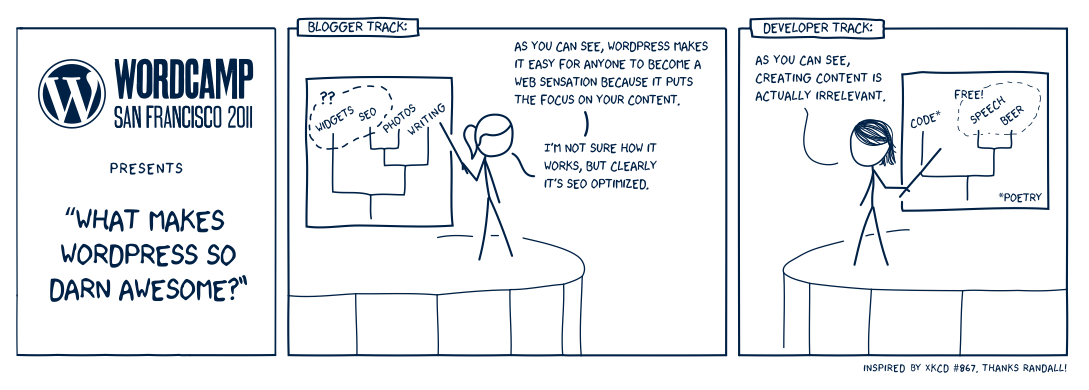
What Makes WordPress so darned Awesome (by Jen Mylo)
That is, it is and it isn’t WordPress. WordPress is SEO optimized out of the box, and your content totally matters. And it’s content that probably landed me so high. You take good content, you add in people linking to your content, you promote yourself with friends who pass it on, and magically your hard work becomes content!
Last week someone told me they wanted to “automate the posting of [original] content” and I was completely bewildered at the concept. The issue, as I understood it, was that posting original content to 100 blogs meant writing original content 100 times. And you can’t automate that. By definition, posting unique posts means … you make unique (aka different) posts. This person went on to say it was time consuming to make 100 posts and create 100 custom links to them. I sat back and blinked a few times, and thought “Well, yeah.”
I say it over and over. A website is work. If people could magically install WordPress and boom, money, then I wouldn’t have a job helping people speed up sites or debug strange conflicts, or a million other weird things I do every day. WordPress can make publishing on the web a heck of a lot easier, but it will never be effortless because effort is what makes your site amazing. Effort and attention are crucial to keeping your site going.
Every time I hear about someone trying to find the quick and easy way around content creation, I shake my head. There isn’t a quick way, there isn’t an easy way, and there isn’t a simple way. Unless you like writing and think that it’s any of those things. But even then, you can’t just write and expect magic to happen. You have to write, and customize, and care, and water, and fertilize your website.
So how did my site get ranked so highly about sex when it’s about tech? If you read the post that got linked, it’s about how you suck. “My question is you suck” is the title, and in there, I talk about what to say when someone says you suck. It’s actually a pretty logical result, when you think about it for a moment. But because enough people link to me, and enough people used the word ‘suck’ in their links, and enough people shared the link, I’m respected by google and score crazy high on a totally non-relevant search.
That’s how you work the system.
Sorry about that, to everyone who is vastly disappointed, having come here via the search result.
If your website is ‘international’, you’ve probably already run into this. If you’ve ever worked for cooperate America, you’ve seen this happen. If you’re on an out of date browser, you’ve definitely seen it.
It’s that horrible day when your site looks like absolute crap because something critical to your site isn’t loading because it cannot be accessed from where you are.
Let’s step back.
Using Google’s Open Sans doesn’t work in China because Google is, generally speaking, blocked in China. What does this mean for people there? Well their WordPress dashboard is going to load slowly, in fact for many it’s so slow as to be unusable. This is because WP 3.8 uses Google fonts on the back-end. Now, you can disable it with the Disable Google Fonts plugin, but many people feel that’s a poor user experience.
I want to take a moment to note that while I, personally, dislike using Google for required fonts on WordPress, there was a discussion on bundling vs linking that took place in November 2013. At that time, everyone agreed bundling (that is including the fonts with WP) would be best, however how to do that was more complicated. In order to provide a good experience for all users and all languages, it got messy and large really fast. You can read up on the history on make/core: Open Sans, bundling vs. linking.
That being said, by remotely calling Google, there are two main issues: privacy (which I’m not getting into) and accessibility (that’s what I want to poke at).
We know that calling Google remotely, for everyone in a country with good internet speeds, is great as it speeds up your site! That’s the premise behind Use Google Libraries after all. If someone’s already downloaded the files in their cache for JS (or fonts), then the next site they visit will load faster if it uses the same ones! It’s a sound, and accurate, theory.
But are you making your site inaccessible with your need for speed?
What happens when someone can’t load Google? In the case of the Use Google Libraries plugin, it falls back to using WP’s standard, which is good, but that initially connection has to fail first! The same happens for WordPress’s back end, which means the time it takes to load your site is longer for those users.
I tell this to people a lot, and generally they reply “Well I don’t have users in China.” or “This doesn’t affect my visitors.” Really? REALLY? Sorry, but that is one of the most shortsighted views I’ve ever heard in the history of ever, and one I tell people “Yeah, that’s an incorrect and rather arrogant conceit.”
Let me tell you a story. I went to Japan for 12 days to hike O’Henro with my Buddhist brother and our agnostic father. We made the “A Jew, a Buddhist, and an Agnostic walk into a temple…” jokes. While there, I checked in on my websites and on my regular sites I visited, only to find out that some were blocked because we were using a net connection that went through a country those sites blocked. Why? Because “no one” who would ever visit their site was from there.
I no longer use those services, I no longer support those sites. My father goes to China regularly (he does risk assessment on the disused weapons caches in China). I turn off Google Fonts on his website in order that he, and his customers, can see the site as intended. You can tell me all you want that ‘no one’ visits from those places, and you’re just wrong, and arrogant, and yes, I strongly disagree with WordPress having made Open Sans via Google a requirement like that.
My personal dislike of Google aside, it’s a reality I look at more than I wish I had to that people and places block third parties. This is why I get on the case of plugin developers who use third-party services when they don’t have to. They’ve created an unnecessary dependency on this other service, which will crazy to debug when someone says their code doesn’t work.
Your code should be as self-sufficient as humanly possible. Offloading for ‘speed’ doesn’t work for all situations, and instead can make things slower by causing more external resources to load. Have you ever looked at those scan reports where they say your site calls too many sites for JS or CSS? This is what you’re doing. Even though it increases the odds that people who can get to these sources will already have the files cached, people who can never access them have a worse time. And then loading them locally will make your site heavier and load slower, unless you use proxy-caching (like Pagespeed or Varnish).
It’s not a perfect solution for everyone. This is why websites are hard.
I’m not a math teacher. I’m not a mathematician. My father, the risk analyst, is a mathematician. We used to play math ‘games’ and I thought that was normal. I was also a very odd child. My mother was convinced something was ‘wrong’ with me because I did “Number Roll” all day at school for the better part of a year. To anyone not from a Montessori school, Number Roll is a bewildering concept, where you just write numbers, incrementing by one, over and over and over again, getting the numbers as high as you could go.
Now, I was always (am still) a hands on learner. Being forced to learn anything by rote memorization is painful. But math is a little different. You can’t ‘understand’ math until you’ve mastered counting. You can’t grasp all the relationships between quantities and numbers without knowing the numbers first. It’s like you can’t learn spelling until you memorized the ABCs.
Number roll is crazy basic. On long sheets of paper, I wrote each number in order, beginning with “1”. I should stress, my mom worried about my intelligence, that I spent days and weeks and months doing this. But what I was really doing was following patterns without knowing it. I mean, I can do my nine-times tables because I know the ‘pattern’ is Plus Minus. Watch:
09
18
27
36
That didn’t make any sense to you? Start with 09. Add 1 to the left and subtract one from the right. Now it’s 18. You do this over and over and over again and it works all the way down. This repetition taught me pattern recognition in a different way and gave me insight into both counting and the meaning behind it. The nines work like that because 10 – 1 = 9, so then logically I could apply this to everything! This is where number roll was suddenly magical, as the Montessori concept is that before children can gain a meaningful understanding of quantities, numbers, and the relationships between them, they need to learn basic counting, but you should understand what counting means.
In other words, math will make more sense if you can see how the numbers fit together.
This is probably why, when I was a kid, I did my multiplication ‘backwards.’ That is, if you asked me to do 123 x 24, I did it left to right. Let me explain. This is how you probably do it:
 123
x 24
----
 492
246
----
2952
Right? You start with the bottom right, so you go “4 times 3 is 12, carry the 1, 4 times 2 is 8 plus one is 9, 4 times 1 is 4.” Most people I know would call this ‘traditional’ math. My math goes left to right, so I get this:
 123
x 24
----
24
 48
  72
----
2952
1 x 24, then 2 x 24, and finally 3 x 24. I can do this fast because I’ve memorized my times tables, but at one point a friend asked me how this was really left to right, because when you look at 3 x 24, you’re back to the old “3 times 4 is 12, carry the 1. 3 times 2 is 6 plus 1 is 7.” Well, when I do ALL all the work, it looks like this:
 123
x 24
----
2000 (100 x 20)
 400 (100 x 4)
 400 (20 x 20)
  80 (20 x 4)
  60 (3 x 20)
  12 (3 x 4)
----
2952
The difference really is I’m breaking apart multiplication into smaller addition steps. And now it makes sense to a lot more people. “100 times 20 is 2000” and so on. Once it’s spread out, it’s easier for someone new to pick up how I did it, and in a sense, why. It’s true left to right, all the way down. I don’t generally do long-form math this way any more, though, because like everyone else I had to learn the ‘real’ way of doing it, but also I started to memorize the patterns. I know without really thinking that 12 times 2 is 48. It’s a common enough equation that I memorized the answer.
That means I can do all this in that even faster way you saw above. I just know that since 1 times anything is itself, the 4 from 24 goes under the one. Sometimes I have to remember to mark my place, if I’m doing less frequently combined numbers (I don’t seem to use 7s times 9s a lot). When that happens, I usually add on the zeros:
 123
x 24
----
2400
 480
  72
----
2952
When I don’t, to make sure I keep my place, I go far left top to far right bottom, since those two have to line up. That means I know the “1 times 4” answer (4) has to be under the 1, and the “1 times 2” answer (2) is one to the left. But that’s the advantage of understanding how all the numbers work together, and sets. I know how certain numbers combine, I’ve memorized their patterns, and I can apply them backwards and forwards not because I know the equations, but because I see the pattern.
Now on to the rather controversial image I posted recently:
New Math
This shows you two ways to solve a problem. First is the ‘traditional’ way, or as I’ll call it, the fast way:
  32
- 12
----
  20
At it’s heart, this is a simple equation. Most of you went “Sure, 3 minus 1 is 2, the 2’s are the same, so 20.” Some of you went “1 plus 2 is 3, so it’s a 2…” Both are correct. Then you get the ‘new’ way:
When I saw this math problem, the first thing I did was the same as you “Why 15!? What?” I mean, we’ve all been told “Show your work, don’t pull numbers out of thin air!” Then I thought back to when I was a kid trying to understand this whole math thing. Fives were easy to remember: 5 10 15 20. It’s either a 0 or a 5, and the number in front went up by 1 every 0. We all kind of got that pretty fast. Number Roll (see?) taught me that concept really early on. That was my lightbulb moment.
“OH! We’re adding X to 12 to get to the 5s, then we add Y to get to the tens, then Z to get to the base of 32 (30), and add the leftovers Q. Add up X, Z, Y, and Q, you get 20!”
This is what I would call “the long way” however the thought occurred to me that this was a number roll-less way to try and teach children how numbers came together! Common Core (which is where this comes from) is actually sneak-teaching kids algebra, while at the same time giving them a reference for that rote memorization they had earlier. You remember your 5 times tables? This is how we use that information in a practical application!
Part of the difference comes in if you think about subtraction as ‘Something new’ or ‘backwards addition.’ I tend to think of it as backwards addition, and multiplication is ‘Faster addition’ (division is ‘faster backwards addition’). I was fairly young when I realized that all math was really, at it’s heart, the same, it was just the formula you slapped in to make it messy. Everything comes down to adding for me, always. We’re all just playing fast ways to do things and solve problems, and this is starting with the long way first.
All this comes back to what Richard Feynman wrote in the essay New Textbooks for the “New” mathematics:
If we would like to, we can and do say, ‘The answer is a whole number less than 9 and bigger than 6,’ but we do not have to say, ‘The answer is a member of the set which is the intersection of the set of those numbers which is larger than 6 and the set of numbers which are smaller than 9’ … In the ‘new’ mathematics, then, first there must be freedom of thought; second, we do not want to teach just words; and third, subjects should not be introduced without explaining the purpose or reason, or without giving any way in which the material could be really used to discover something interesting. I don’t think it is worth while teaching such material.
It’s his third point that I believe Common Core is trying to address. How many of you were taught the purpose of your times tables, after all? How many of you understood the reason besides ‘so I can pass the class’ that we learned to think of numbers and how they were put together? A lot of people seem to think that Feynman didn’t like kids to learn the application of math, to understand what it meant, but that’s incorrect. He rallied against new math because it lacked word problems and applications of use! Yes, you hated those word problems, but they were meant to teach you application. Instead most people learned how to pick out the important bits and do the math as a simple formula to which they could apply that rote memorization.
There’s a problem with this, though, and Common Core has the same problem that New Math does and that the ‘traditional’ way did back when I was a kid, so this is nothing new. It forces kids to learn in one way, and one way only. I was incredibly lucky in that my father let me do math my own way (he found it interesting), and once I showed my work (see above) he and my teachers saw that I had in fact achieved the absolute goal of number roll: I internalized the connection between math equations and the numbers.
Rote memorization has a place. You memorize the tables, you can do math faster, and things like calculus will be surprisingly easier to you because all you have to do is put the numbers into the formula. At the same time, some of the other concepts will be a struggle because you don’t get the connections, you only know memorization and implementation.
I will note that once you’ve memorized this stuff, it’s all a lot faster. I tend to count on my fingers when I’m trying to math days of the week (like today is the 5th, so next Wednesday is 12th) because I’m messing with names (Wednesday) and numbers, and then I have to remember how many days are in March, but I can do all this in my head, including calculating tax. And no, I don’t think it’s ‘cheating’ to use a calculator. The point is understanding what the relationships between the numbers are, knowing what formula to apply when and where, and enjoy it.
That was the goal of New Math, you know. To make math something kids wanted to do. You should read Feynman’s “Surely you’re joking, Mr. Feynman!” and follow his account of being on the board to set up these new curriculums, and you’ll see exactly why they continue to fail over and over. It’s a pity, too, since I bet some kids are looking at the Core method and there’s a lightbulb going on over their heads. I hope parents aren’t scaring their own kids off math because the adults don’t understand this new stuff.
Of course, a lot of this is the fault of the school system, in that the parents aren’t taught what the kids are learning or why. If you’re learning something at school, and at home your parents go “What? This is bullshit!” you’re going to have a harder time learning and accepting. Don’t believe me? Creationism. You’re welcome. The point being you have to reinforce what a kid learns at school in the home or they have to come to terms with the dichotomy of difference at a stage when they don’t understand enough of the world to get what that meant.
Not that having multiple choices is great for every kid. Some people freak out when there’s more than one right answer, especially in math which in the beginning is remarkably straightforward (like spelling). There’s one right answer, but now you’re giving them multiple paths (spelling has this too, by the by: color, colour; grey, gray). It breaks brains. This, perhaps, is a little bit why WordPress is “Decisions, not options.” Maybe we’re giving people the options too soon, but when it comes to learning, we adults should already know there isn’t one ‘right’ way to learn and master skills. And with math, there isn’t going to be one perfect way to get those base concepts into their minds.
Cookie Consent
We use cookies to improve your experience on our site. By using our site, you consent to cookies.
Contains information related to marketing campaigns of the user. These are shared with Google AdWords / Google Ads when the Google Ads and Google Analytics accounts are linked together.
90 days
__utmx
Used to determine whether a user is included in an A / B or Multivariate test.
18 months
_gali
Used by Google Analytics to determine which links on a page are being clicked
30 seconds
_ga_
ID used to identify users
2 years
_ga
Used to distinguish users.
2 years
_gat
Used to throttle request rate.
1 minute
_gid
Used to distinguish users.
24 hours
__utma
Used to distinguish users.
Persistent
__utmb
Used to determine new sessions/visits.
30 minutes
__utmc
Used to determine if the user is in a new session/visit.
Session
__utmt
Used to throttle request rate.
10 minutes
__utmv
Used to store visitor-level custom variable data.
2 years
__utmz
Stores the traffic source or campaign that explains how the user reached your site.


 There are a lot of you guys who use WordPress (probably that’s my fault) and like me, you bash your head in when a news source makes a video embedable, but only if you use their code. Why is this a problem? Most of us like using WP’s visual editor, and that means we have to switch to text mode, paste this in, and then never ever ever visit that page in the visual editor again:


 Oh, in the short term they’re helping you by giving you something for free. They’re getting you further in your site development than ever before. However that help ends at the provisioning level, because you aren’t paying for support from these resellers, you’re paying for product. That’s okay, so long as you know what you’re paying for, and a lot of people don’t. If people did know what they were paying for, they wouldn’t use nulled themes with base64 backdoors in them.
 So back to this whole “I’ll take your paid software and give it away” thing.


 Every time I hear about someone trying to find the quick and easy way around content creation, I shake my head. There isn’t a quick way, there isn’t an easy way, and there isn’t a simple way. Unless you like writing and think that it’s any of those things. But even then, you can’t just write and expect magic to happen. You have to write, and customize, and care, and water, and fertilize your website.


